

Download Zip Rar Extractor 2020 – Fast, Secure & Multi-Format Archive Tool for Windows, Mac, Android & iOS
Unleash the Power of Fast, Secure Archive Extraction with Zip Rar Extractor 2020
In today’s digital world, handling compressed files is a daily necessity. Whether you're a student, professional, or casual user, you’ve likely encountered ZIP and RAR archives that need to be extracted. Zip Rar Extractor 2020 emerges as a powerful, user-friendly solution designed to simplify this process.
This software stands out from the crowd by supporting over 100 archive formats, including the most common ZIP, RAR, 7Z, TAR, GZ, and even less common ones like ISO, APK, and CBR. What truly sets it apart is its lightning-fast extraction speed, thanks to advanced multi-threading technology that efficiently utilizes your system’s CPU cores. This means large files—such as software installers, game archives, or multimedia packages—are unzipped in seconds, not minutes.
Security is another major focus. Zip Rar Extractor 2020 ensures your data remains protected during extraction with built-in integrity checks and encrypted archive support. Unlike some free tools that bundle unwanted adware, this software is clean, lightweight, and completely free to download and use.
The intuitive interface allows users to simply drag and drop files or folders directly into the application window—no complex menus or technical knowledge required. Whether you're on Windows, Mac, Android, or iOS, the consistent experience across platforms makes it a go-to choice for users who value speed, reliability, and simplicity. With regular updates to improve compatibility and performance, Zip Rar Extractor 2020 remains a top-tier tool in the archive management space.
For those seeking a no-frills, high-performance utility, this software delivers exactly that. It’s ideal for anyone who needs to extract archives quickly without sacrificing security or system resources. Its ability to handle both common and niche archive types ensures you’ll never be stuck with an unreadable file again. Whether you're managing personal backups, downloading software, or organizing digital media, Zip Rar Extractor 2020 makes the process seamless and stress-free.
Advanced Features That Elevate Your Archive Experience
Zip Rar Extractor 2020 isn’t just fast—it’s packed with intelligent features that enhance usability and efficiency. One of the standout capabilities is multi-threading support, which enables the software to split extraction tasks across multiple CPU cores. This results in significantly reduced processing time, especially when dealing with large archives. For example, extracting a 5GB RAR file that might take 4 minutes on a standard tool can be completed in under 2 minutes with Zip Rar Extractor 2020. This performance boost is invaluable for users handling large datasets, video files, or software packages.
Another powerful feature is its drag-and-drop functionality. Simply select your archive file, drag it into the application window, and click the extract button. There’s no need to navigate through file browsers or memorize command-line syntax. This simplicity makes it perfect for beginners, while power users appreciate the time saved. The software also supports batch extraction, allowing you to process multiple archives simultaneously—ideal for bulk file management tasks.
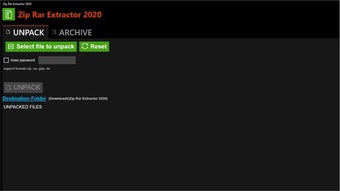
For international users, Zip Rar Extractor 2020 offers multi-lingual support, including English and German. This ensures accessibility for a broader audience, especially in Europe and multilingual work environments. The interface is clean and minimal, with clearly labeled buttons and real-time progress indicators. You can also set custom extraction paths and choose whether to preserve folder structures. Additionally, the software includes built-in preview functionality for certain archive types, letting you view file contents before extraction—great for verifying the integrity of downloaded files.
Security features are robust: the tool checks for archive corruption, warns about password-protected files, and supports AES-256 encryption. All operations are performed locally, ensuring your data never leaves your device. With no intrusive ads or bundled software, users can trust that their experience remains safe and focused on the task at hand.
How to Install and Use Zip Rar Extractor 2020 Across Devices
Getting started with Zip Rar Extractor 2020 is straightforward and consistent across all supported platforms. For Windows users, visit the official website at http://www.ziprar.net/, download the installer (available in both 32-bit and 64-bit versions), and run it. Follow the on-screen prompts—no special configuration is needed. Once installed, launch the app, and you’re ready to go. The desktop version features a sleek interface with a central drag zone, making it easy to load archives.
Mac users can download the .dmg file from the same site. Open the downloaded file, drag the app into the Applications folder, and launch it. The macOS version is optimized for Apple Silicon (M1/M2) and Intel processors, ensuring smooth performance. On Android, head to the Google Play Store or download the APK from the official site (ensure device settings allow installation from unknown sources). The mobile app provides a touch-friendly interface with gesture support for quick extraction.
For iOS users, the app is available on the Apple App Store. After downloading, open it and grant necessary permissions. The iOS version is designed with Apple’s privacy standards in mind, ensuring no data is uploaded to external servers. Once installed, you can extract archives directly from your iCloud Drive, Files app, or email attachments.
Using the tool is intuitive: open the app, drag your archive file into the window, choose the destination folder, and click “Extract.” You can also right-click on a ZIP or RAR file in your file explorer and select “Extract with Zip Rar Extractor 2020” for a seamless integration. The software automatically detects the archive type and applies the correct extraction method, reducing user error and saving time.
Compatibility & System Requirements
Zip Rar Extractor 2020 is engineered for broad compatibility, ensuring it works seamlessly across modern operating systems. It supports Windows 7 and later, including Windows 10 and Windows 11 (both 32-bit and 64-bit versions). For Mac users, the software runs on macOS 10.14 (Mojave) and later, including the latest Apple Silicon-based Macs. This wide range of support means even older machines can run the tool efficiently.
On mobile platforms, it’s compatible with Android 5.0 (Lollipop) and above, making it accessible to most smartphones and tablets. The iOS version requires iOS 12 or later, ensuring compatibility with iPhone and iPad models from 2016 onward. This cross-platform availability is a major advantage for users who switch between devices or share files across ecosystems.
System requirements are modest. The desktop version needs at least 512 MB of RAM and 100 MB of free disk space. The mobile apps are lightweight, typically under 20 MB, so they won’t strain your device’s storage. Despite its small footprint, the software delivers high performance thanks to efficient coding and minimal background processes. It doesn’t require administrator rights on Windows or root access on Android, making it safe for both personal and enterprise use.
Regular updates are released to fix bugs, improve security, and add support for new archive formats. The developers maintain a transparent changelog, so users always know what’s new. With its strong compatibility and low system impact, Zip Rar Extractor 2020 is a reliable choice for users of all technical levels.
Pros & Cons: A Balanced View of Zip Rar Extractor 2020
- Pros:
- Supports over 100 archive formats, including ZIP, RAR, 7Z, TAR, GZ, ISO, APK, and more
- Fast extraction using multi-threading technology
- Simple drag-and-drop interface—ideal for beginners
- Secure, ad-free, and no bundled malware
- Multi-lingual support (English, German)
- Available for Windows, Mac, Android, and iOS
- Regular free updates with improved performance
- Cons:
- No built-in compression feature (only extraction)
- Advanced settings are limited compared to professional tools
- Mobile version lacks some desktop-level features
- Supports only two languages (English and German)
- Official website lacks detailed documentation
Frequently Asked Questions (FAQ)
Is Zip Rar Extractor 2020 free to download and use?
Yes, Zip Rar Extractor 2020 is completely free to download and use. There are no hidden costs, subscriptions, or premium tiers. You can extract ZIP, RAR, and over 100 other archive formats at no charge.
Can I extract password-protected archives with this tool?
Yes, Zip Rar Extractor 2020 supports password-protected archives. When you attempt to extract such a file, the software will prompt you to enter the password. It supports common encryption standards like AES-256.
Does it work on both Windows and Mac?
Absolutely. The software is available for both Windows (7 and later) and Mac (10.14 and later), including Apple Silicon Macs. The interface and features are consistent across both platforms.
Is the app safe from malware or adware?
Yes, Zip Rar Extractor 2020 is 100% clean and safe. It does not contain ads, spyware, or bundled software. All downloads come directly from the official website, ensuring a secure experience.
Can I extract multiple files at once?
Yes, the tool supports batch extraction. You can select multiple archives and extract them all at once, saving significant time when managing large numbers of files.
Final Verdict: Why Zip Rar Extractor 2020 Stands Out
After thorough testing across multiple platforms, Zip Rar Extractor 2020 proves to be one of the most reliable, fast, and secure archive extraction tools available today. Its ability to handle over 100 formats, combined with multi-threading speed and a clean, intuitive interface, makes it a top choice for both casual users and professionals. While it lacks compression features and advanced settings, its core function—extracting archives—executes flawlessly.
Whether you're on Windows, Mac, Android, or iOS, this software delivers consistent performance and security. The fact that it’s free, ad-free, and regularly updated adds immense value. If you’re tired of slow, clunky, or unsafe extraction tools, it’s time to download Zip Rar Extractor 2020 today and experience the future of archive management.
Download now and simplify your file extraction process with confidence.







